United States · PDF to Excel, CSV, QBO, OFX, Xero
Convert Wells Fargo statements to Excel, CSV or QBO
BetaBeta: built from the bank's published layout
Wells Fargo prints the ending daily balance only on the last row of each day. The converter checks those daily balances and the statement totals. Download Excel, CSV, QBO, OFX, Xero CSV or QuickBooks Online CSV; the PDF never leaves your device. Beta: tested on synthetic replicas of the Wells Fargo layout, not yet on real statements. Wrong row? Click "This row is wrong".
Wells Fargo statement at a glance
- Country
- United States
- Statement columns
- Date · Reference · Description · Credit · Debit · Balance
- Date format
- MM/DD
- Number format
- 1,234.56
- Currency
- USD
- Balance check
- Running balance on every row, then the closing balance
- Export formats
- Excel (XLSX) · CSV · QBO (Web Connect) · OFX · Xero CSV · QuickBooks Online CSV
- CSV from the bank
- Not offered
Wells Fargo statement layout
What the statement shows
- Online statements cover one statement cycle and do not include pending transactions.
- Statements show the ending daily balance, a figure set once a day during overnight processing.
- The ending daily balance can differ from the live available balance, which changes through the day.
- Statements we have seen described have a transaction history with Date, Check Number, Description, Deposits/Credits, Withdrawals/Debits and Ending daily balance columns, with dates as M/D without a year.
- As described, the ending daily balance is printed only on the last transaction of each day, and a Totals row closes the table.
How the converter reads it
A Wells Fargo online statement covers one statement cycle and does not include pending transactions. If something is still pending on the last day of the cycle, it will not be on this statement. That is the first thing to remember when a converted statement does not match what you saw in online banking on the same day.
More detail
The second is the difference between two balances. Wells Fargo statements show the ending daily balance, a figure the bank sets once a day during overnight processing. The available balance you see in online banking changes through the day, so the two can differ. The ending daily balance is the one printed on the statement, and it is the one the converter checks against.
According to third-party descriptions of the layout, which Wells Fargo has not confirmed, the transaction history has six columns: Date, Check Number, Description, Deposits/Credits, Withdrawals/Debits and Ending daily balance. Dates are written as month and day, such as 3/14, with no year. The converter takes the year from the statement period and writes full ISO dates in the export.
Deposits and withdrawals are separate columns. A figure in Deposits/Credits becomes a positive amount and a figure in Withdrawals/Debits a negative one. There is no minus sign to read.
The balance column is sparse. The ending daily balance is printed only on the last transaction of each day, so on a day with five card payments, four rows have an empty balance. The converter checks each printed daily balance against the amounts since the previous one, and the whole statement is checked from the beginning balance to the ending balance. A Totals row closes the table; it sums the columns and is not a transaction, so it is left out of the export.
Checks have a column of their own for the check number. This version does not read the Check Number column separately, so the number may end up next to the description or be missing from the export. If you track checks by number, compare a few rows with the PDF.
To get the PDF, sign on to Wells Fargo Online, open the account, select Statements & Documents and open the statement as a PDF. In the Wells Fargo Mobile app, open the account and go to Statements & Documents. The official pages that were checked describe statements and account activity, but they did not confirm a CSV download, so this page does not count on one.
Wells Fargo is marked Beta. The layout was checked against Wells Fargo help pages and a consumer disclosure, plus third-party descriptions for the column details, and tested on synthetic replicas rather than on real statements. Scanned or photographed statements are not supported.
After a clean check, export to Excel or CSV, or to QBO, OFX or the Xero CSV layout.
Sources: the bank's help pages and public descriptions of sample statements.
How to download your statement from Wells Fargo
On the website
- Sign on to Wells Fargo Online and open the account.
- Select Statements & Documents and open the statement as a PDF.
In the mobile app
- In the Wells Fargo Mobile app open the account, then Statements & Documents.
Steps checked: November 1, 2026. No native CSV export is documented. The official pages found describe statements and account activity only; a CSV option was not confirmed from them.
Sample preview and test results
Synthetic sample, not a real statement. Open the synthetic sample PDF
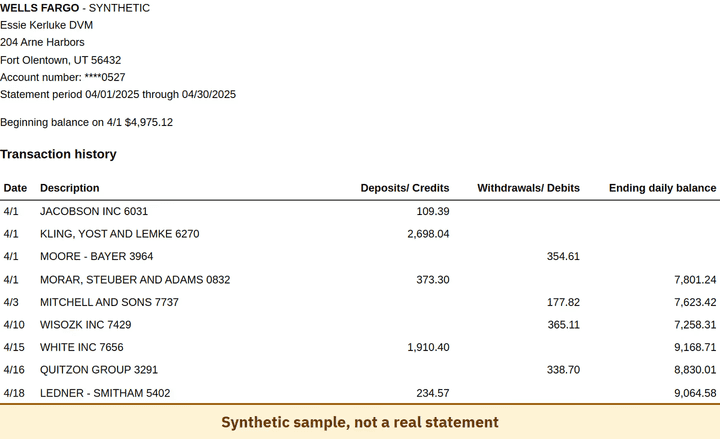
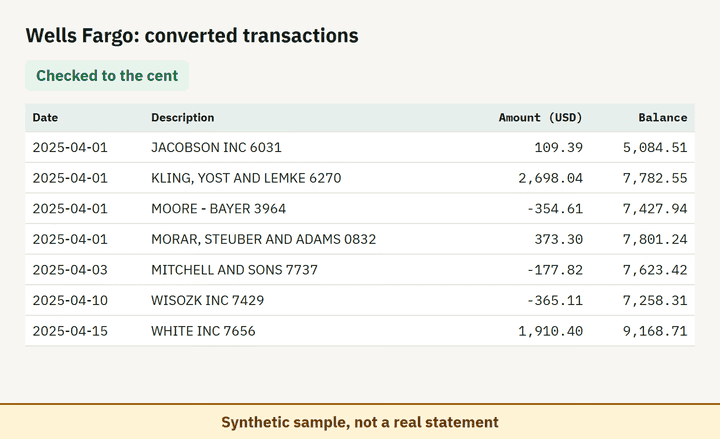
- Balance check passed on 100% of 8 perturbed synthetic files.
Which file to download from a Wells Fargo statement
| Format | Imports into | Status |
|---|---|---|
| Excel (XLSX) | Microsoft Excel, Google Sheets, LibreOffice Calc, Apple Numbers | Available |
| CSV | Excel, Google Sheets, databases and scripts, most accounting tools that accept a custom CSV | Available |
| QBO (Web Connect) | QuickBooks Online (bank upload) | Available, follows the Intuit Web Connect specification |
| OFX | Xero, GnuCash, Moneydance, Banktivity, MoneyMoney, QuickBooks Online (bank upload) | Available, follows the OFX 2.2 specification |
| Xero CSV | Xero (Import a statement) | Available, follows the Xero CSV template |
| QuickBooks Online CSV | QuickBooks Online (Upload transactions) | Available, follows the QuickBooks Online 3-column layout |
Known limitations
- Beta: tested on synthetic replicas built from public Wells Fargo layout information, not yet on real statements. If the result looks wrong, mark the row with 'This row is wrong' or use 'Send page layout', which sends the masked layout only and none of your figures.
- The Check Number column is not read separately in this version.
- Scanned or photographed statements are not supported.
Wells Fargo statement FAQ
Can I convert a Wells Fargo PDF statement to Excel?
Yes. Drop the PDF into the converter on this page; it reads the credit and debit columns and checks the result against the statement balances.
Why is the balance missing on most Wells Fargo rows?
Wells Fargo prints the ending daily balance once per day, on the last transaction of that day, so the check uses those daily balances and the totals.
Do statements include pending transactions?
No. Statements cover a statement cycle and exclude pending items.
Why does the statement balance differ from my available balance?
The statement shows the ending daily balance, set once a day overnight. The available balance changes through the day, so the two can differ.
Can I just use ChatGPT to convert my Wells Fargo statement?
For a short statement, if you check the totals yourself. Here every Wells Fargo row is checked against the statement balances for you. Converter or ChatGPT? See our comparison.
Test status
Last tested: November 2, 2026