United Kingdom · PDF to Excel, CSV, QBO, OFX, Xero
Convert HSBC UK statements to Excel, CSV or QBO
BetaBeta: built from the bank's published layout
HSBC UK prints the date once per day and the balance once per day. The converter fills in the gaps and checks each daily balance. Download Excel, CSV, QBO, OFX, Xero CSV or QuickBooks Online CSV; the PDF never leaves your device. Beta: tested on synthetic replicas of the HSBC UK layout, not yet on real statements. Wrong row? Click "This row is wrong".
HSBC UK statement at a glance
- Country
- United Kingdom
- Statement columns
- Date · Description · Debit · Credit · Balance
- Date format
- D MMM YY, D MMM YYYY, D MMM
- Number format
- 1,234.56
- Currency
- GBP
- Balance check
- Running balance on every row, then the closing balance
- Export formats
- Excel (XLSX) · CSV · QBO (Web Connect) · OFX · Xero CSV · QuickBooks Online CSV
- CSV from the bank
- Not offered
HSBC UK statement layout
What the statement shows
- The official statement guide explains statement abbreviations and lists the account summary: opening balance, payments in, payments out and closing balance.
- The guide lists statement abbreviations including CR (credit), DD (Direct Debit), DR (debit), SO (standing order), CHQ (cheque) and TRF (transfer).
- Public descriptions say statements list transactions in columns Date, Payment type and details (Description on some replicas), Paid out, Paid in and Balance; the sign comes from the column.
- As described, the date and the running balance are printed only once per day, on the first and last transaction of that day respectively.
- Dates are described in the form DD Mon YY (for example 03 Dec 25) and a Balance brought forward line starts each page.
How the converter reads it
HSBC UK publishes a short guide to reading its statements, and two things from it matter for conversion. The first is the account summary: opening balance, payments in, payments out and closing balance. Those four figures are the yardstick the converted rows are measured against. The second is the payment-type code at the start of each description. HSBC lists DD as Direct Debit, SO as standing order, CR as credit and TRF as transfer. The converter keeps these codes in the description column, so you can still filter a spreadsheet by them later.
More detail
- Third-party guides say an overdrawn balance may carry the suffix OD. The OD suffix is not read yet, so such a balance would fail the check.
The transaction table, as described by third-party guides, has the columns Date, Payment type and details, Paid out, Paid in and Balance. The direction of a payment comes from the column it is printed in. Paid out becomes a negative amount in the export and Paid in a positive one.
What makes HSBC harder than most UK banks is how sparsely it prints dates and balances. The date appears only on the first transaction of a day. If you paid for coffee, a train ticket and a grocery shop on the same Tuesday, only the coffee row carries the date; the other two rows leave it blank. The converter carries the date down to every row of that day, so each line in the export has its own date.
The balance works the other way round. It is printed once per day, on the last transaction of that day. Rows in the middle of a busy day have no balance at all. The converter can check each daily balance against the amounts above it, and it fills in the rest from the amounts. Because the balances in the middle of the day are not printed, a mistake that cancels itself out within a single day could in theory pass the daily check, but it would still show up against the closing balance in the summary if it changed the total.
Dates use the form DD Mon YY, such as 03 Dec 25, and each page begins with a Balance brought forward line that repeats the balance from the page before. Third-party guides say an overdrawn balance can carry the letters OD. The converter does not read that suffix yet, so a statement with an overdrawn balance is likely to fail the balance check.
To download a statement, sign in to HSBC UK Online Banking, choose the account, open Statements, pick the period and save the PDF. In the HSBC UK app, open the account and select Statements. An official page confirming a native CSV export was not found, so this page does not assume you have one.
HSBC UK is marked Beta here. Apart from the official reading guide, the column layout and the once-per-day date and balance pattern come from third-party guides. Support for HSBC UK has been tested on synthetic replicas, not on real statements. Scanned or photographed statements are not supported.
Once the balance check passes, export to Excel or CSV, or to QBO, OFX or the Xero CSV layout for your accounting software.
Sources: the bank's help pages and public descriptions of sample statements.
How to download your statement from HSBC UK
On the website
- Sign in to HSBC UK Online Banking and choose the account.
- Open Statements and select the statement period, then download it as PDF.
In the mobile app
- In the HSBC UK app open the account, then select Statements and choose the statement to view or save.
Steps checked: November 1, 2026. No native CSV export is documented. Not confirmed on an official page; this converter does not rely on a native CSV export.
Sample preview and test results
Synthetic sample, not a real statement. Open the synthetic sample PDF
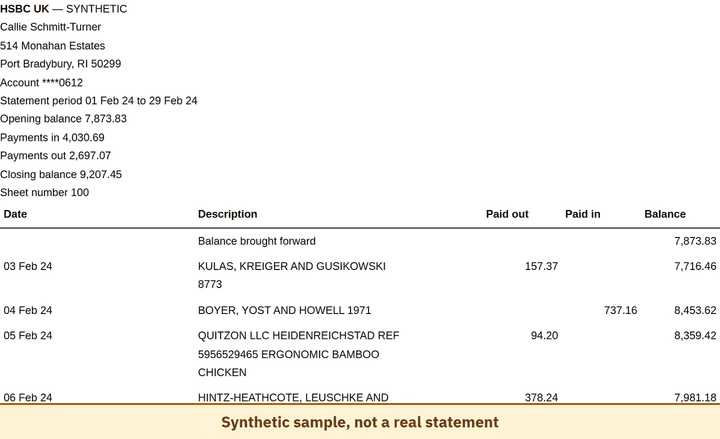
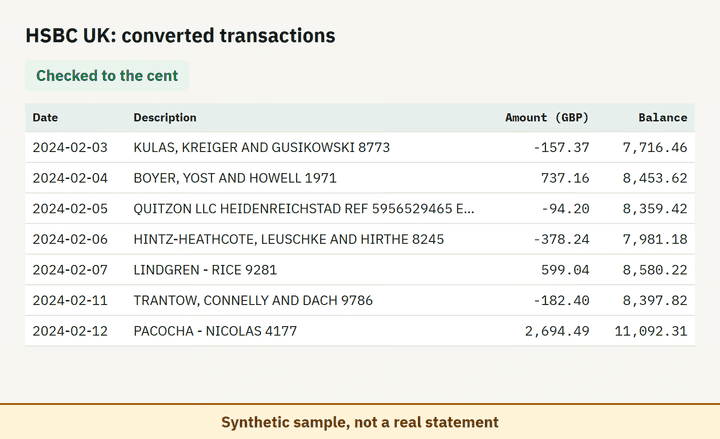
- Balance check passed on 100% of 8 perturbed synthetic files.
Which file to download from a HSBC UK statement
| Format | Imports into | Status |
|---|---|---|
| Excel (XLSX) | Microsoft Excel, Google Sheets, LibreOffice Calc, Apple Numbers | Available |
| CSV | Excel, Google Sheets, databases and scripts, most accounting tools that accept a custom CSV | Available |
| QBO (Web Connect) | QuickBooks Online (bank upload) | Available, follows the Intuit Web Connect specification |
| OFX | Xero, GnuCash, Moneydance, Banktivity, MoneyMoney, QuickBooks Online (bank upload) | Available, follows the OFX 2.2 specification |
| Xero CSV | Xero (Import a statement) | Available, follows the Xero CSV template |
| QuickBooks Online CSV | QuickBooks Online (Upload transactions) | Available, follows the QuickBooks Online 3-column layout |
Known limitations
- Beta: tested on synthetic replicas built from public HSBC UK layout information, not yet on real statements. If the result looks wrong, mark the row with 'This row is wrong' or use 'Send page layout', which sends the masked layout only and none of your figures.
- An overdrawn balance with the OD suffix is not read yet: the balance check will fail on that statement instead of guessing the sign.
- Intermediate balances inside a day are not printed, so only the end-of-day balance is cross-checked.
- Scanned or photographed statements are not supported.
HSBC UK statement FAQ
Can I convert an HSBC UK PDF statement to Excel?
Yes. Drop the PDF into the converter on this page; it reads Paid out, Paid in and Balance and checks the result against the statement balances.
Why does my HSBC statement show a balance only once a day?
HSBC prints the balance on the last transaction of each day. The converter checks that balance and rebuilds the rest from the amounts.
What do DD, SO, CR and TRF mean on an HSBC statement?
HSBC lists them as Direct Debit, standing order, credit and transfer. They stay in the description column.
Can I import the result into QuickBooks or Xero?
Yes. Export to QBO, OFX or the Xero CSV layout after the balance check passes.
Can I just use ChatGPT to convert my HSBC UK statement?
For a short statement, if you check the totals yourself. Here every HSBC UK row is checked against the statement balances for you. Converter or ChatGPT? See our comparison.
Test status
Last tested: November 2, 2026