United Kingdom · PDF to Excel, CSV, QBO, OFX, Xero
Convert NatWest statements to Excel, CSV or QBO
BetaBeta: built from the bank's published layout
NatWest Online Banking lists PDF statements by account and year. The converter reads the Paid in and Paid out columns and checks every row against the balance. Download Excel, CSV, QBO, OFX, Xero CSV or QuickBooks Online CSV; the PDF never leaves your device. Beta: tested on synthetic replicas of the NatWest layout, not yet on real statements. Wrong row? Click "This row is wrong".
NatWest statement at a glance
- Country
- United Kingdom
- Statement columns
- Date · Type · Description · Debit · Credit · Balance
- Date format
- D MMM YYYY, D MMM YY, D MMM
- Number format
- 1,234.56
- Currency
- GBP
- Balance check
- Running balance on every row, then the closing balance
- Export formats
- Excel (XLSX) · CSV · QBO (Web Connect) · OFX · Xero CSV · QuickBooks Online CSV
- CSV from the bank
- Not offered
NatWest statement layout
What the statement shows
- In Online Banking, Statements & transactions, then Statements, lists the statements for the chosen account and year; each statement cycle downloads as a PDF.
- Public descriptions say statements list transactions in columns Date, Description, Paid in, Paid out and Balance; column wording can differ between account types.
- As described, Paid in and Paid out are separate columns, so the sign comes from the column and amounts are printed without a minus sign.
- Dates are described as printed as day, short month and year (for example 03 Dec 2025), once per day.
- A running Balance column and a BROUGHT FORWARD line giving the opening balance are described.
How the converter reads it
NatWest statements are PDF documents that you can download, save and print from Online Banking, where a time period dropdown switches between years. The mobile app also lists statements and lets you export them.
More detail
- In the NatWest app, statements are opened from the 3-dot account menu and can be exported from the export button at the top right.
Statements we have seen described have a transaction table with five columns: Date, Description, Paid in, Paid out and Balance. The wording is said to differ between account types, so a savings or business statement may label the columns slightly differently. Paid in and Paid out are separate, and the figures in them are printed without a sign. In the export, Paid out becomes a negative amount and Paid in a positive one.
Dates are described as written in full, with the day, a short month and a four-digit year, for example 03 Dec 2025. They are printed once per day: when several payments land on the same date, only the first row shows it, and the rows below it are left blank in the Date column. The converter fills the date down to each row of that day, so every line in the spreadsheet can be sorted and filtered on its own.
A running Balance column is described, which makes the statement easy to check. Each row's balance should equal the previous balance plus what was paid in, minus what was paid out. The table opens with a BROUGHT FORWARD line, which is the balance carried over from the previous page or statement. That line is not a payment, so it is not exported as one; the converter takes it as the opening balance and works forward from it. If a row does not reconcile, it is flagged, so you know which line to look at.
Some NatWest statements carry an optional Type column with a short payment code. That column is not read as a separate field yet. If your statement has it, the code may end up inside the description text, and it is worth a quick look at the first page of the export.
To download a statement in Online Banking, choose Statements & transactions from the main menu, then Statements under Your statements, change the year with the time period dropdown if needed, and select the statement cycle; it downloads as a PDF. In the app, open the account, tap the 3-dot icon at the top, choose Statements and use the export button. The NatWest help pages on statements talk about viewing, saving and printing PDFs, and do not mention a CSV export of the statement itself.
A common reason to convert NatWest statements is a long history. If you need two or three years of history for a mortgage broker, an accountant or a tax return, you will likely be downloading a stack of monthly PDFs from the browser. Converting them gives you one file per statement that you can combine in a spreadsheet.
NatWest is marked Beta on this site. The layout was checked against NatWest help pages and public descriptions, and support for NatWest was tested on synthetic replicas built from that public layout information, not yet on real statements. If the result looks wrong, mark the row with "This row is wrong" or use "Send page layout", which sends the masked layout only and none of your figures. Scanned or photographed statements are not supported.
When the balance check passes, you can export Excel or CSV, or a QBO, OFX or Xero CSV file for import.
Sources: the bank's help pages and public descriptions of sample statements.
How to download your statement from NatWest
On the website
- Log in to Online Banking and choose Statements & transactions from the main menu.
- Under Your statements select Statements; change the account or the year with the time period dropdown if needed.
- Select the statement cycle link and it downloads as a PDF.
In the mobile app
- In the NatWest app open the account, tap the 3-dot icon at the top and choose Statements.
- Select the statement, then use the export button at the top right to save or share it.
Steps checked: November 1, 2026. No native CSV export is documented. The official statement help pages describe PDF viewing, saving and printing only; no CSV export is mentioned.
Sample preview and test results
Synthetic sample, not a real statement. Open the synthetic sample PDF
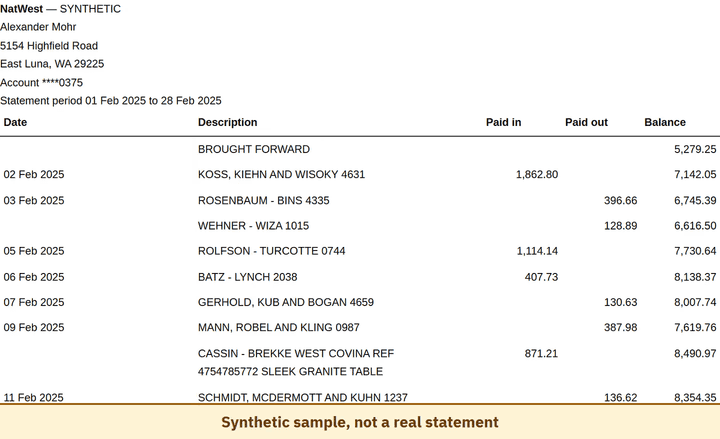
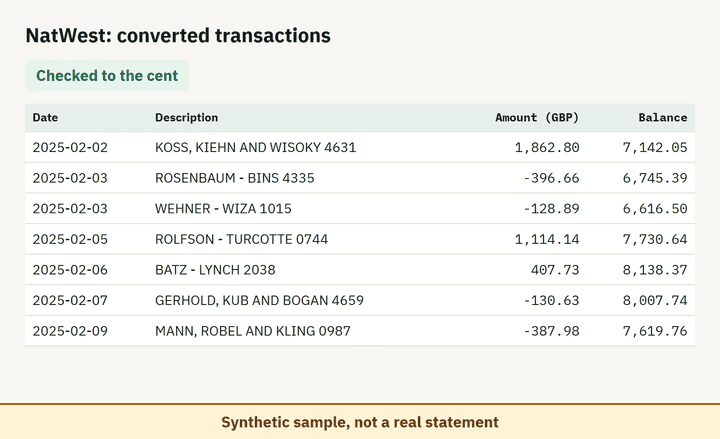
- Balance check passed on 100% of 8 perturbed synthetic files.
Which file to download from a NatWest statement
| Format | Imports into | Status |
|---|---|---|
| Excel (XLSX) | Microsoft Excel, Google Sheets, LibreOffice Calc, Apple Numbers | Available |
| CSV | Excel, Google Sheets, databases and scripts, most accounting tools that accept a custom CSV | Available |
| QBO (Web Connect) | QuickBooks Online (bank upload) | Available, follows the Intuit Web Connect specification |
| OFX | Xero, GnuCash, Moneydance, Banktivity, MoneyMoney, QuickBooks Online (bank upload) | Available, follows the OFX 2.2 specification |
| Xero CSV | Xero (Import a statement) | Available, follows the Xero CSV template |
| QuickBooks Online CSV | QuickBooks Online (Upload transactions) | Available, follows the QuickBooks Online 3-column layout |
Known limitations
- Beta: tested on synthetic replicas built from public NatWest layout information, not yet on real statements. If the result looks wrong, mark the row with 'This row is wrong' or use 'Send page layout', which sends the masked layout only and none of your figures.
- Scanned or photographed statements are not supported.
- The optional Type column on some NatWest statements is not read as a separate field yet.
NatWest statement FAQ
Can I convert a NatWest PDF statement to Excel?
Yes. Drop the PDF into the converter on this page; it reads the Paid in, Paid out and Balance columns and checks the result against the statement balances.
How do I download a NatWest statement as PDF?
In Online Banking choose Statements & transactions, then Statements, and select the cycle. In the app use the 3-dot account menu, then Statements.
How do I pick an older NatWest statement?
In Online Banking change the year with the time period dropdown on the Statements page, then select the statement cycle.
What does BROUGHT FORWARD mean on a NatWest statement?
It is the balance carried over from the previous page or period. The converter uses it as the opening balance.
Can I import the result into QuickBooks or Xero?
Yes. Export to QBO, OFX or the Xero CSV layout after the balance check passes.
Can I just use ChatGPT to convert my NatWest statement?
For a short statement, if you check the totals yourself. Here every NatWest row is checked against the statement balances for you. Converter or ChatGPT? See our comparison.
Test status
Last tested: November 1, 2026