United Kingdom · PDF to Excel, CSV, QBO, OFX, Xero
Convert Monzo statements to Excel, CSV or QBO
BetaBeta: built from the bank's published layout
Monzo can export CSV and QIF itself. When you only have the PDF, the converter reads it and checks the rows against the opening and closing balance. Download Excel, CSV, QBO, OFX, Xero CSV or QuickBooks Online CSV; the PDF never leaves your device. Beta: tested on synthetic replicas of the Monzo layout, not yet on real statements. Wrong row? Click "This row is wrong".
Monzo statement at a glance
- Country
- United Kingdom
- Statement columns
- Date · Description · Amount · Balance
- Date format
- DD/MM/YYYY, D MMM YYYY
- Number format
- 1,234.56
- Currency
- GBP
- Balance check
- Running balance on every row, then the closing balance
- Export formats
- Excel (XLSX) · CSV · QBO (Web Connect) · OFX · Xero CSV · QuickBooks Online CSV
- CSV from the bank
- Available
Monzo statement layout
What the statement shows
- Personal statements are requested in the app (Home, three dots under the card, Bank statements) for a chosen date range.
- Available formats are PDF, CSV and QIF.
- The statement download includes Pots.
- The name and address printed are those on the final day of the selected date range.
- Business accounts use Manage next to the transaction feed, then Bank statements; pot statements are available through chat only.
How the converter reads it
Monzo is one of the few UK banks that gives you a statement in more than one format straight from the app. When you request a statement you choose a date range and then PDF, CSV or QIF. If CSV or QIF covers what you need, you may not need a converter at all. This page is for the cases where the PDF is what you have: an old download, a file sent to a landlord or lender, or a statement someone forwarded to you.
More detail
- Statements we have seen described list transactions with DD/MM/YYYY dates and a single signed amount column (money out negative).
For a personal account, statements live in the app. Tap Home, then the three dots under your card, then Bank statements, choose the range and the format, and download or share the file. Monzo does not offer a web download for personal statements. Business accounts work a little differently: you open Manage next to the transaction feed and then Bank statements, and statements for business pots are available only through chat.
A Monzo statement includes your pots. Their transactions appear after the main account statement, in the same file. That is handy, but it also means one PDF can hold more than one running balance. Pot sections are not treated as separate accounts, so if you move money in and out of pots a lot, look over the end of the export, where the pot rows sit, before you import it anywhere.
The name and address printed at the top are the ones on file on the last day of the date range you chose. If you moved house in the middle of the year and need a statement with the old address, choose a range that ends before the move.
On the transaction table itself, Monzo publishes little. Third-party descriptions, which Monzo has not confirmed, show dates written in full as DD/MM/YYYY and a single Amount column in which money out is negative and money in is positive. The converter reads that signed amount as it is printed. Long merchant names and payment references often wrap onto a second line, and the converter joins those lines back into the description of the row they belong to.
Each conversion is checked against the opening and closing balances on the statement. If the rows do not add up to the change between those two figures, the converter says so.
Monzo is marked Beta on this site. The test replica was built from Monzo's public help pages plus an assumed layout, not from a real statement, and the column headings are not confirmed by any official Monzo page. If the real layout differs, the balance check is the place where you will see it.
When the numbers reconcile, download Excel or CSV, or produce a QBO, OFX or Xero CSV file. If you already have Monzo's own CSV for the same period, it is a good idea to compare the two exports once.
Sources: the bank's help pages and public descriptions of sample statements.
How to download your statement from Monzo
On the website
- Monzo has no web statement download for personal accounts; use the app.
In the mobile app
- Tap Home, then the three dots under your card.
- Tap Bank statements.
- Choose a date range and the format (PDF, CSV or QIF).
- Download or share the file.
Steps checked: November 1, 2026. The bank also offers a CSV export. Monzo exports CSV and QIF itself from the app. Use the PDF converter when only the PDF is available.
Sample preview and test results
Synthetic sample, not a real statement. Open the synthetic sample PDF
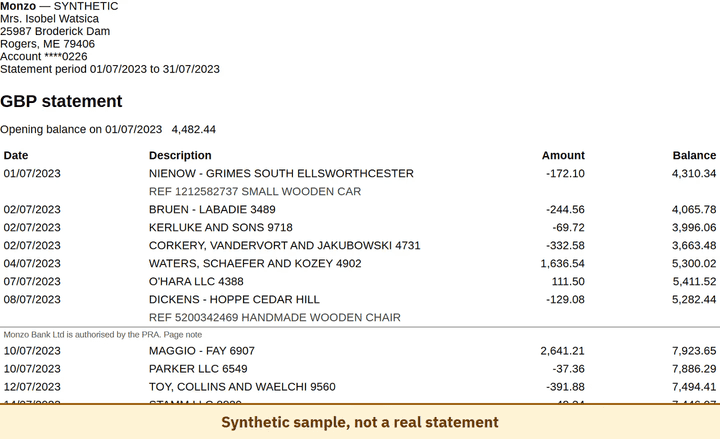
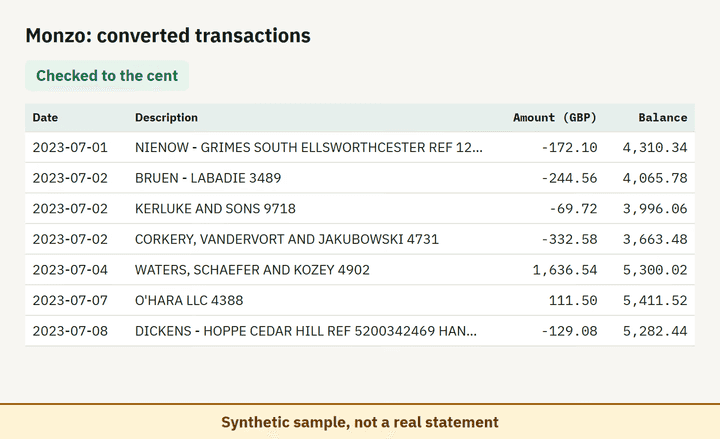
- Balance check passed on 100% of 8 perturbed synthetic files.
Which file to download from a Monzo statement
| Format | Imports into | Status |
|---|---|---|
| Excel (XLSX) | Microsoft Excel, Google Sheets, LibreOffice Calc, Apple Numbers | Available |
| CSV | Excel, Google Sheets, databases and scripts, most accounting tools that accept a custom CSV | Available |
| QBO (Web Connect) | QuickBooks Online (bank upload) | Available, follows the Intuit Web Connect specification |
| OFX | Xero, GnuCash, Moneydance, Banktivity, MoneyMoney, QuickBooks Online (bank upload) | Available, follows the OFX 2.2 specification |
| Xero CSV | Xero (Import a statement) | Available, follows the Xero CSV template |
| QuickBooks Online CSV | QuickBooks Online (Upload transactions) | Available, follows the QuickBooks Online 3-column layout |
Known limitations
- Beta: tested on synthetic replicas built from public Monzo layout information, not yet on real statements. If the result looks wrong, mark the row with 'This row is wrong' or use 'Send page layout', which sends the masked layout only and none of your figures.
- Column headings and the single signed Amount column are unconfirmed by official pages.
- Pot sections are not modelled separately.
Monzo statement FAQ
Can I convert a Monzo PDF statement to Excel or CSV?
Yes. Drop the PDF into the converter on this page; it checks opening and closing balances and exports XLSX or CSV. Monzo can also export CSV itself.
Does the Monzo statement include my pots?
Monzo says its statement download includes Pots. This converter does not split Pot sections out separately.
Can I get Monzo transactions as QIF or CSV?
Yes, choose CSV or QIF when downloading the statement in the app.
Which name and address appear on a Monzo statement?
The ones on your account on the last day of the date range you choose. Pick a range that ends before a move if you need the old address.
Can I just use ChatGPT to convert my Monzo statement?
For a short statement, if you check the totals yourself. Here every Monzo row is checked against the statement balances for you. Converter or ChatGPT? See our comparison.
Test status
Last tested: November 1, 2026